

What is the Cloud Compute Environment?
The Cloud Compute Environment is a fully-featured, sandboxed Linux environment that runs in Komo’s secure cloud infrastructure. Each agent operates in its own isolated compute instance with:- Persistent file system - Files and data persist across agent executions
- Terminal access - Execute shell commands, run scripts, install software
- Computational resources - CPU, memory, and storage dedicated to agent workloads
- Network connectivity - Access to internet, APIs, and external services
- 24/7 availability - No downtime, always ready for scheduled or triggered execution
Why Cloud Compute Matters
The Problem with Local Execution
Traditional automation tools require your local computer to:- Remain powered on and connected
- Have sufficient resources available
- Handle interruptions (sleep mode, network loss, crashes)
- Manage security of local credentials and data
- Can’t run overnight or multi-day tasks reliably
- Computer resources compete with your daily work
- Security risks from storing credentials locally
- No scalability—limited by single machine capacity
The Cloud Compute Solution
Komo’s Cloud Compute Environment eliminates these limitations: Always-On Operations- Run tasks 24/7 without your computer online
- Schedule agents for overnight or weekend execution
- Multi-day workflows complete reliably
- Dedicated compute resources per agent
- No impact on your local machine performance
- Scale to hundreds of parallel agents
- Isolated sandbox environment per user
- No local access to your computer or files
- Credentials managed in encrypted cloud storage
- Complete audit trail of all operations
- Enterprise-grade infrastructure
- 99.9% uptime guarantee
- Automatic failover and recovery
- Horizontal scaling for parallel execution
How It Works
1. Automatic Provisioning
When you create an agent, Komo automatically provisions:- Isolated Linux container
- Persistent file system (/workspace directory)
- Network connectivity
- Computational resources
- Pre-installed tools and libraries
2. Persistent Workspace
Each agent has a dedicated/workspace directory that persists across executions:
/workspace/temp/ with limited retention:
- Standard retention: 1 day from creation
- Automatic cleanup: Files deleted after retention period expires
- Enterprise custom retention: Contact admin@komo.ai for custom retention policies (30/60/90 days or indefinite storage)
3. Tool Availability
Pre-installed tools in every compute environment: Programming Languages:- Python (with pip)
- Node.js (with npm)
- Ruby
- Go
- Pandas, NumPy (Python)
- Excel/CSV processors
- JSON/XML parsers
- Database clients (PostgreSQL, MySQL, MongoDB)
- Browser automation libraries
- HTTP clients
- Web scraping tools
- API integration utilities
- Git (version control)
- wget/curl (downloads)
- Text processors (sed, awk, grep)
- Compression utilities
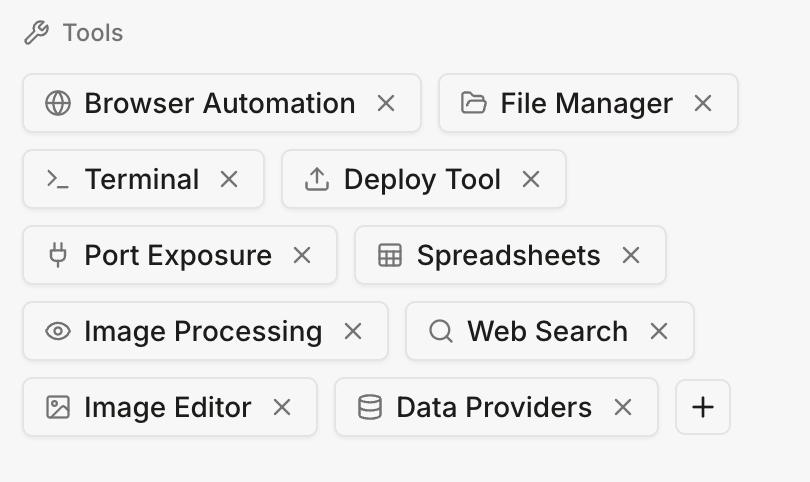
Tools section of the playbook’s sidebar:
- Browser automation
- File Manager
- Terminal tools
- Deploy tools
- Image processing tools
- Data provider tools (Linkedin, Pitchbook etc)
- Image Editor
- (Enterprise) Other custom tools to pre-install
4. Execution Model
Background Execution:- Agents run independently of your connection
- You can close your browser—agents continue running
- Check status anytime via Activity Monitor
- Tasks can run for hours or days
- No timeout limitations
- Progress tracked in real-time
- Run multiple agents simultaneously
- Each in isolated environment
- No resource contention
Real-World Examples
Example 1: Daily Market Research (Always-On)
Scenario: Investment team needs daily competitive intelligence Agent Configuration:- Schedule: Every weekday at 6 AM EST
- Environment: Cloud compute (runs even when team offline)
- Research 20 competitor companies
- Download latest financial filings
- Extract key metrics to
/workspace/competitors.db - Analyze pricing changes vs. yesterday’s data
- Generate trend report
- Post summary to Slack #competitive-intel
- Team sees report when they arrive at 9 AM
- Runs reliably every morning
- No team member needs to be online
- 90 days of historical data accumulated in
/workspace - Complete competitive intelligence ready each morning
Example 2: Multi-Day Data Processing
Scenario: Data team needs to process 10TB dataset Why Cloud Compute:- Process would take 36 hours
- Can’t keep laptop running for 36 hours straight
- Need reliable, uninterrupted execution
- Hour 0: Download dataset chunks to
/workspace/data/ - Hour 6: Process first 25% of data
- Hour 12: Process 50% complete (your computer can sleep/shutdown)
- Hour 24: Process 75% complete (agent still running in cloud)
- Hour 36: Processing complete, results in
/workspace/outputs/ - Agent notifies: “Processing complete. Results ready for download.”
- Completed reliably over weekend
- No local computer resources used
- Results ready Monday morning
Example 3: Parallel Research Execution
Scenario: Research team needs analysis of 500 companies Why Cloud Compute:- Sequential processing would take days
- Need to deploy multiple agents simultaneously
- Require reliable, scalable execution
- Each agent: isolated environment with own
/workspace - Each agent: researches 10 companies independently
- All agents: execute simultaneously
- Results: each agent produces report in their
/workspace - Aggregation agent: collects all reports into master dataset
- Time: 2 hours (vs. 100+ hours sequential)
- 50x faster through multi-agent parallelization
- Each agent runs independently
- No local resources used
- Scalable to 1000s of companies
Example 4: Scheduled Backup & Monitoring
Scenario: DevOps team needs continuous infrastructure monitoring Agent Configuration:- Schedule: Every 15 minutes, 24/7
- Environment: Cloud compute (never stops)
- Query production database health
- Check API response times
- Monitor error rates
- Compare against baselines in
/workspace/metrics/ - If anomaly detected: alert #devops-alerts Slack
- Update
/workspace/metrics/historical.db - Generate weekly trend report (every Monday)
- 24/7 monitoring without dedicated server
- Historical data accumulated automatically
- Anomalies detected in real-time
- Zero maintenance required
Security & Isolation
Sandboxed Execution
Each agent runs in a completely isolated container: Network Isolation:- No access to other agents’ environments
- No access to Komo’s internal systems
- Outbound internet access only (controlled)
- Each agent has separate
/workspace - No cross-agent file access
- No access to host system
- Agents cannot see other agents’ processes
- Resource limits enforced
- Prevents one agent from affecting others
No Local Access
Critical Security Benefit:- Agents NEVER access your local computer
- No local files, no local browsing history
- No local credentials or cookies
- Complete separation from your personal system
- Your local data remains private
- Local security posture unchanged
- No malware risk to local machine
- No performance impact on local computer
Credential Management
Secure Storage:- API keys and credentials stored encrypted
- Separate encrypted vault per user
- Never logged or exposed in plain text
- Credentials accessible only to your agents
- Time-limited access tokens
- Revocable at any time
- Complete log of credential usage
- Which agent accessed what, when
- Export logs for compliance
Managing Cloud Compute
File Management
Download Files:- Download any file from
/workspaceto local machine - Bulk download entire directories
- Access temporary files within retention period
- Upload datasets, scripts, configuration files
- Agents can access uploaded files immediately
- View storage usage per agent
- Clean up old files manually
- Archive historical data
- Temporary files auto-deleted per retention policy
Best Practices
Use Cloud Compute For:
✅ Scheduled & Triggered Tasks- Agents running on schedule (daily/weekly/monthly)
- Event-driven workflows (when X happens, do Y)
- Background processing without human supervision
- Tasks taking hours or days
- Large-scale data processing
- Multi-step workflows with dependencies
- Processing hundreds/thousands of items
- Multi-agent coordination
- High-volume operations
- 24/7 surveillance and alerting
- Continuous data collection
- Real-time anomaly detection
Common Questions
Q: Does cloud compute access my local computer? A: No. Cloud compute runs entirely in isolated cloud infrastructure. Zero access to your local machine, files, or network. Q: What happens if my internet disconnects? A: Agents continue running in the cloud. Reconnect anytime to check status and results. Q: Can agents run while I’m offline? A: Yes. That’s the primary benefit. Schedule agents to run overnight, weekends, anytime—no need to be online. Q: How is cloud compute different from cloud browser? A: Cloud compute is the full Linux environment (terminal, file system, tools). Cloud browser is the web browser running within that environment. Q: Is my data secure in cloud compute? A: Yes. Isolated containers, encrypted storage, no cross-user access, full audit trails. Enterprise-grade security. Q: What are the resource limits? A: Varies by plan. Standard: 4 CPU cores, 16GB RAM, 100GB storage per agent. Enterprise: customizable. Q: Can I install custom software? A: Yes. This is an Enterprise feature, please contact sales team for requests. Q: Can multiple agents share data? A: Within same workspace, yes. Agents can read/write shared/workspace directory.
Q: How long are temporary files kept?
A: Standard: 1 day from creation, then automatically deleted. Enterprise: custom retention available—contact admin@komo.ai.
Q: Can I access temp files from previous sessions?
A: Yes, if within the 1-day retention window. After that, they’re automatically cleaned up to save storage.
Run complex, long-duration tasks in secure cloud environments without keeping your computer online. Launch your agents at komo.ai.