

What is Structured Research?
Structured Research is a spreadsheet-like interface where AI becomes your research team, filling in information across rows and columns at massive scale. Unlike traditional chat-based AI that handles one question at a time, Structured Research enables systematic analysis of:- Thousands of entities (companies, people, products, markets)
- Hundreds of thousands of documents (contracts, filings, reports, agreements)
- Complex data extracted and synthesized with full citations
- Enrichment Tables - Research entities and enrich with specific data points
- Document Tables - Upload documents and extract answers systematically
Why Structured Research vs. Chat Interfaces
The Chat Interface Problem
Traditional AI chat (including ChatGPT) is designed for conversational, one-off queries: Limitations:- ❌ One question at a time = hours of repetitive prompting
- ❌ No systematic organization of findings
- ❌ Difficult to compare across multiple entities
- ❌ Hard to verify sources for each claim
- ❌ Results scattered across conversation history
- ❌ Not scalable beyond ~10 items
The Structured Research Solution
Komo’s table interface is built for systematic, scalable research: Advantages:- ✅ Research 100, 1000, or 1M entities simultaneously—all cells processed in parallel for maximum speed
- ✅ Systematic organization in rows & columns
- ✅ Side-by-side comparison built-in
- ✅ Cell-level citations and explanations
- ✅ Export to Excel/CSV for further analysis
- ✅ 10-100x faster than sequential research thanks to parallel processing
Enrichment Tables
What are Enrichment Tables?
Enrichment Tables let you research entities (companies, people, products, markets) by listing them in rows and defining research questions as columns. AI fills every cell with researched, cited information.How It Works
1. Create Your Table Start at komo.ai/structured → New Enrichment Table 2. Define Rows (Entities) Enter entities to research:- Companies: “Cursor, GitHub Copilot, Codeium, Replit…”
- People: “CEOs of Fortune 500 companies”
- Products: “Top 50 SaaS project management tools”
- Markets: “Emerging AI application categories”
- Manually (type or paste)
- Import from CSV/Excel
- Generate from prompt (“Top 100 YC companies from W24 batch”)
- “Tagline / One-liner”
- “Key Differentiators / Moat Thesis”
- “Target Segments (Indie/SMB/MM/Enterprise)”
- “Lead Investor”
- “Latest Funding Round”
- “Headquarters Location”
- Selecting individual cells
- Selecting entire rows or columns
- Selecting multiple ranges
- Or selecting all cells in the table
- Accurate, up-to-date information
- Inline citations
- Source links
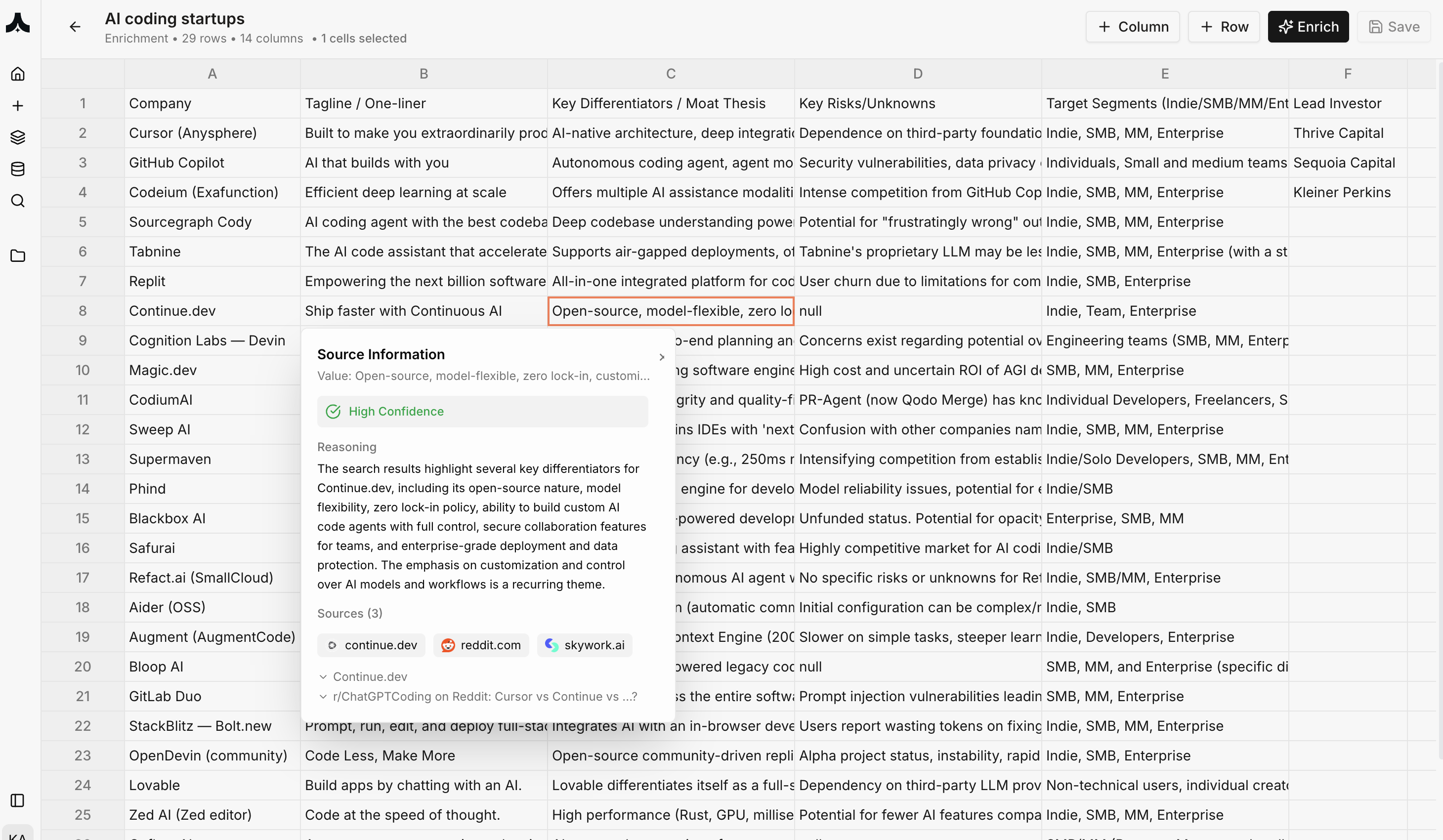
- Source Information Panel (right sidebar)
- Exact value extracted
- Confidence level (High/Medium/Low)
- Reasoning explaining how AI arrived at answer
- 4+ sources with direct links
- Preview quotes from each source
Real-World Example: VC Deal Sourcing
Scenario: VC analyst evaluating AI coding startups Enrichment Table Setup: Rows: 29 AI coding companies (Cursor, GitHub Copilot, Codeium, Replit, etc.) Columns:- Company
- Tagline / One-liner
- Key Differentiators / Moat Thesis
- Key Risks/Unknowns
- Target Segments (Indie/SMB/MM/Enterprise)
- Lead Investor
- Latest Funding Amount
- Founding Year
- Team Size
- GitHub Stars (if open source)
- Pricing Model
- Key Integrations
- Customer Reviews Summary
- Competitive Advantages
- Import list of 29 companies
- Define 14 research columns
- Select all cells to enrich
- Click “Enrich”
- AI researches 406 data points (29 × 14) in parallel
- Complete in 15 minutes
- Complete competitive landscape in single view
- Every claim verifiable with sources
- Export to pitch deck or investment memo
- Share with team for collaborative review
Document Tables
What are Document Tables?
Document Tables let you upload dozens, hundreds, or thousands of documents, then extract structured information by asking questions across all documents simultaneously.How It Works
1. Create Document Table Start at komo.ai/structured → New Document Table 2. Upload Documents Upload files in bulk:- Contracts: NDAs, MSAs, vendor agreements
- Financial docs: 10-Ks, earnings calls, investor decks
- Legal: Depositions, briefs, discovery documents
- Research: Market reports, analyst notes, expert calls
- Internal: Memos, presentations, strategy documents
- “What is the termination clause?”
- “What are the liability limits?”
- “Who are the key decision makers mentioned?”
- “What are the main risks identified?”
- “What is the projected market size?”
- Extracted answer
- Direct quote from source document
- Page number reference
- Confidence level
- Supporting context
Real-World Example: M&A Due Diligence
Scenario: Corporate development team reviewing acquisition target Document Table Setup: Documents Uploaded (87 files):- Financial statements (5 years)
- Customer contracts (42 contracts)
- Employee agreements (28 employees)
- IP and patent documents (8 filings)
- Board meeting minutes (4 years)
- Document Name
- Document Type
- Key Terms Summary
- Red Flags Identified
- Financial Obligations
- Termination Clauses
- Liability Caps
- Revenue Recognition Terms (contracts)
- IP Ownership Clarity
- Material Risks Disclosed
- Upload 87 due diligence documents
- Define 10 extraction columns
- Select all cells to enrich
- Click “Enrich”
- AI analyzes 870 data points in parallel across all docs
- Complete in 30 minutes
- 87 documents systematically analyzed
- Key risks surfaced automatically
- Every finding backed by document excerpt
- Legal team focuses on flagged issues only
- Due diligence time reduced from weeks to days
Use Cases by Industry
Investment Management
Deal Sourcing- Research 500 companies in target sector
- Columns: Funding, growth metrics, team backgrounds, competitive moat
- Systematic pipeline building
- Upload 30 documents from VDR
- Extract: financials, risks, opportunities, management commentary
- Auto-generate first draft of investment memo
- Upload quarterly reports from 40 portfolio companies
- Extract: KPIs, risks, guidance changes, management concerns
- Quarterly board prep automated
Legal
Contract Review- Upload 200 vendor contracts
- Extract: liability caps, termination terms, non-standard provisions
- Identify outliers requiring negotiation
- Upload 500 pages of deposition transcripts
- Extract: contradictions, key admissions, timeline of events
- Build case strategy systematically
- Upload 1000 customer contracts
- Check: GDPR compliance, data retention terms, jurisdiction clauses
- Proactive compliance audit
Corporate Development
M&A Screening- Research 100 potential acquisition targets
- Columns: Revenue, growth, technology stack, customer overlap
- Prioritize top 10 for deep dive
- Upload RFP responses from 15 vendors
- Extract: pricing, capabilities, implementation time, references
- Objective comparison matrix
- Research 50 competitors
- Columns: Product updates, funding, customer reviews, pricing changes
- Quarterly competitive landscape report
Consulting
Market Research- Upload 40 industry reports
- Extract: market size, growth drivers, key players, trends
- Synthesize into client-ready insights
- Upload transcripts from 25 expert interviews
- Extract: key themes, contradicting views, consensus opinions
- Build point-of-view document
- Research 100 companies in client’s industry
- Columns: Operational metrics, best practices, digital maturity
- Identify improvement opportunities
Real Estate
Property Analysis- Research 200 properties in target market
- Columns: Valuation, cap rate, occupancy, tenant quality, risks
- Investment pipeline prioritization
- Upload 50 property documents per deal
- Extract: lease terms, rent rolls, violations, maintenance issues
- Comprehensive property profile
- Research 100 comparable sales
- Columns: Sale price, price per sq ft, buyer, seller, terms
- Market trend analysis
Key Features & Differentiators
1. Massive Scale with Parallel Processing
- Komo: Process 1, 1000, or hundreds of thousands of entities/documents simultaneously in parallel
- Chat interfaces: Practical limit of ~10 before becoming unusable, processed sequentially
2. Systematic Organization
- Komo: Table format enables side-by-side comparison, sorting, filtering
- Chat interfaces: Linear conversation, difficult to compare findings
3. Cell-Level Citations
- Komo: Click any cell to see sources, reasoning, confidence
- Chat interfaces: Citations (if any) at response level, not claim level
4. Verifiable Research
- Komo: Every cell has confidence score + 4+ sources with direct quotes
- Competitors (Hebbia): Source attribution but less granular verification
5. Export & Collaboration
- Komo: Export to Excel/CSV for presentation or further analysis
- Komo: Share tables with team, collaborate on research
6. Speed at Scale
100 entities × 10 columns = 1000 research points- Komo Structured Research: 15-20 minutes
- Manual research: 50+ hours
- Chat interface: 5-10 hours of repetitive prompting
Best Practices
Enrichment Tables
Be Specific with Column Names:- ✅ “Target customer segment (Indie/SMB/MM/Enterprise)”
- ✅ “Latest funding round (Series, amount, lead investor, date)”
- ❌ “Customers” (too vague)
- ❌ “Funding” (ambiguous - total raised vs. latest round?)
- Create table with 3-4 essential columns
- Enrich and review results
- Add more columns based on findings
- Enrich only new columns (faster)
- High Confidence (✅): Use directly
- Medium Confidence (⚠️): Verify sources
- Low Confidence (❌): May need manual research
- Enrich basic data in Structured Research
- Use Deep Search for complex follow-ups
- Export to Content Creation for presentations
Document Tables
Organize Documents by Type:- Create separate tables for contracts vs. financial docs vs. legal docs
- Different document types = different relevant columns
- ✅ “What is the total contract value in USD?”
- ✅ “List all termination clauses with notice periods”
- ❌ “Summarize the contract” (too broad)
- Always click cells for high-stakes decisions
- Review direct quotes from source documents
- Check page numbers for context
- Sort/filter to identify outliers
- “Which contracts have liability caps below $1M?”
- “Which agreements have auto-renewal clauses?”
Comparison: Komo vs. Hebbia vs. ChatGPT
| Capability | Komo Structured Research | Hebbia | ChatGPT Plus |
|---|---|---|---|
| Entity Enrichment | ✅ Up to 1M entities | ❌ Document-focused | ⚠️ Manual, <10 entities practical |
| Document Analysis | ✅ Unlimited documents | ✅ Unlimited documents | ⚠️ Limited to conversation context |
| Table Interface | ✅ Spreadsheet-like | ✅ Table format | ❌ Chat only |
| Cell-Level Citations | ✅ Click any cell | ⚠️ Document-level citations | ⚠️ Response-level citations |
| Confidence Scores | ✅ High/Medium/Low per cell | ❌ | ❌ |
| Export | ✅ Excel, CSV | ✅ Export available | ❌ Copy-paste only |
| Scale | ✅ Hundreds of thousands of entities/documents | ✅ Large document sets | ❌ Conversation-based |
| Speed (100 entities) | 15 mins | N/A | 5+ hours |
| Reasoning Transparency | ✅ Per cell | ⚠️ Per document | ⚠️ Per response |
- Researching many entities (companies, people, products)
- Need systematic comparison across entities
- Want granular cell-level verification
- Exporting to Excel for presentations/analysis
- Hebbia: Complex legal document workflows, enterprise legal teams
- ChatGPT: Conversational exploration, creative tasks, one-off questions
Common Questions
Q: How many entities can I research at once? A: Up to hundreds of thousands of entities. Practical limits depend on column complexity. Standard: 100-1000 entities works smoothly. All enrichments run in parallel for maximum speed. Q: How many documents can I upload? A: No hard limit. Users have analyzed 10,000+ documents in a single table. Upload time depends on file sizes. Q: How long does enrichment take? A: Depends on rows × columns. Generally: 100 entities × 10 columns = 15-20 minutes. 1000 entities × 10 columns = 2-3 hours. Q: Can I add more columns after initial enrichment? A: Yes. Add columns anytime and enrich only new columns (faster than re-enriching entire table). Q: What if a cell has wrong information? A: Click cell to see sources. If sources are weak, manually edit cell. Report issue to improve AI accuracy. Q: Can I filter and sort like Excel? A: Yes. Full spreadsheet functionality: sort, filter, search within table. Q: What file formats for documents? A: PDF, Word (.docx), PowerPoint (.pptx), Excel (.xlsx), images (with OCR), plain text. Q: How are documents processed? A: OCR for images/scanned PDFs, text extraction for digital docs, intelligent parsing of tables and structured content. Q: Can I share tables with my team? A: Yes. Share link or export. Collaborate by adding team members (permissions: view/edit). Q: Does this work for non-English documents? A: Yes. Supports major languages. Specify language if needed: “Extract in Spanish.” Q: How is this different from uploading docs to ChatGPT? A: ChatGPT processes documents conversationally. Komo extracts structured data across ALL documents systematically in table format with cell-level citations. Q: Can I use my own data sources (internal databases)? A: Yes. Integrate via API or upload exported data. Enterprise: custom integrations available.Research thousands of entities or documents systematically with full citations. Start your structured research at komo.ai.