

What is Data Room & Document Research?
Data Room is your AI-powered document assistant that reads, analyzes, and answers questions about your uploaded files. Whether you’re reviewing a single contract or analyzing hundreds of documents, Data Room provides accurate answers with complete transparency into the source material. Core Capabilities:- Large Document Support - Handle documents of any size, from single pages to 1000+ page reports
- Natural Language Q&A - Ask complex questions in plain English
- Detailed Quote Citations - See exact text excerpts that support each answer
- Page-Level References - Jump directly to relevant sections in source documents
- Multi-Document Analysis - Ask questions across multiple documents simultaneously
- Context-Aware Responses - AI understands document structure and relationships
The Komo Difference: Verifiable Document Citations
The Document Chatbot Problem
Most AI document tools (including ChatGPT with document upload) provide answers but make verification difficult: Limitations:- ❌ Generic citations like “according to the document”
- ❌ No easy way to see exact quotes
- ❌ Difficult to verify AI didn’t hallucinate
- ❌ Can’t quickly jump to source location
- ❌ Answers feel like black boxes
The Data Room Solution
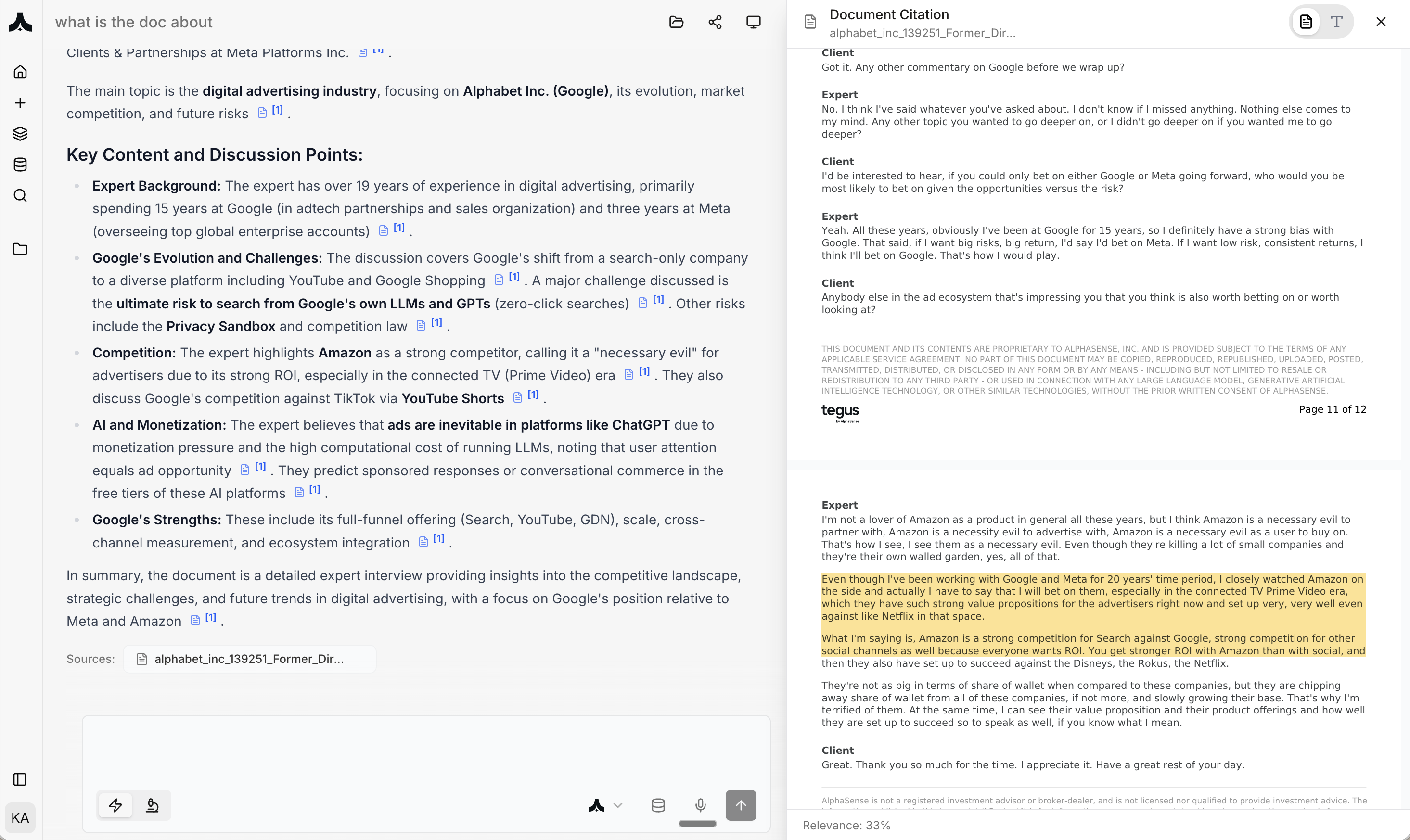
Komo’s unique split-screen interface provides complete transparency: Left Side: AI-Generated Answer- Comprehensive response to your question
- Inline citation markers [1], [2], [3]
- Structured formatting (bullet points, summaries)
- Natural language explanations
- Full document viewer with highlighting
- Exact quotes extracted from source
- Page numbers for each reference
- Relevance scoring for each section
- Jump directly to highlighted text in PDF
How Document Citations Work
Example Query: “What is the doc about?”- ✅ Instant Verification - Click citation [1] to see exact source text
- ✅ No Hallucinations - Every claim backed by document excerpt
- ✅ Legal Defensibility - Page-level references for audits and compliance
- ✅ Build Trust - See AI’s reasoning and evidence simultaneously
- ✅ Professional Work - Suitable for contracts, due diligence, legal review
How It Works
1. Upload Documents
Navigate to komo.ai/data-room → Upload Documents Supported Formats:- PDF (including scanned/image PDFs with OCR)
- Microsoft Word (.docx, .doc)
- PowerPoint (.pptx, .ppt)
- Excel (.xlsx, .xls)
- Plain text (.txt)
- Images (JPG, PNG - with OCR)
- Rich text formats
- Single documents: Up to 10,000 pages
- Total storage: Based on plan (Standard: 10GB, Enterprise: unlimited)
- Create folders for different projects
- Tag documents by type (contract, report, transcript)
- Search uploaded documents
- Share document sets with team
2. Select Documents for Chat
Single Document Analysis:- Click document in Data Room
- Click “Chat with Document”
- Start asking questions
- Select multiple documents (checkbox)
- Click “Chat with Selected” (e.g., “Chat with 12 documents”)
- Ask questions that span all selected files
3. Ask Questions
Types of Questions: Extraction Questions:- “What is the contract termination clause?”
- “What are the key risks mentioned in this report?”
- “Who are the decision makers identified in this document?”
- “Summarize the main findings of this research report”
- “What are the 5 key takeaways from this transcript?”
- “Give me an executive summary of this proposal”
- “What are the differences between Contract A and Contract B?”
- “Are there any red flags in these agreements?”
- “How does this company’s financial performance compare to last year?”
- “Which vendor offers the best pricing?”
- “Compare the liability caps across all 10 contracts”
- “What common themes appear across all interview transcripts?“
4. Review Answers with Citations
Every answer includes:- Inline Citations: Click [1], [2], [3] to jump to source
- Citation Panel: See exact quotes and page numbers
- Document Viewer: Full PDF with highlighted relevant sections
- Relevance Score: AI confidence in each cited section
- Read AI’s answer in left panel
- Check citations in right panel
- Click citation number to see document highlight
- Verify quote matches AI’s interpretation
- Read surrounding context if needed
5. Continue Conversation
Follow-Up Questions:- “Tell me more about the liability section”
- “What page discusses termination fees?”
- “Are there any exceptions to this clause?”
- “Focus only on financial terms”
- “Ignore the appendices”
- “Just look at sections 5-8”
- Start broad: “What is this document about?”
- Drill down: “Tell me more about the competitive analysis section”
- Extract specific: “What exact market share numbers are mentioned?”
Real-World Use Cases
Use Case 1: Contract Review & Red Flag Identification
Scenario: Legal team reviewing 20 vendor contracts for non-standard terms Workflow:- Upload 20 vendor contracts to Data Room
- Select all 20 contracts
- Ask: “What are the key terms in these contracts? Flag any clauses that are non-standard or risky.”
- Exact text: “Vendor’s total liability shall not exceed $50,000…”
- Page reference: Page 7, Section 8.1
- Full context available in highlighted PDF
- 20 contracts reviewed in 10 minutes (vs. 20+ hours manual)
- 3 high-risk contracts flagged for negotiation
- Every finding verifiable with page numbers
- Legal team focuses on exceptions, not reading every page
Use Case 2: Due Diligence Document Analysis
Scenario: M&A team conducting due diligence on acquisition target Documents Uploaded (45 files):- Financial statements (last 3 years)
- Customer contracts (top 10 customers)
- Employee agreements
- Board minutes
- IP/patent documents
- Regulatory filings
- Exact quote from source document
- Document name and page number
- Click to view full context in PDF
- Relevance scoring
- 45 documents analyzed systematically
- Material risks surfaced automatically
- Every claim verifiable with source
- Due diligence time reduced from weeks to days
- Investment committee has complete documentation trail
Use Case 3: Expert Interview Analysis
Scenario: Consulting team analyzing 15 expert call transcripts Query:- Click [7] to see full context in Interview #7 transcript
- Highlighted quote on page with surrounding conversation
- Expert background and credentials visible
- 15 transcripts synthesized into actionable insights
- Consensus vs. debate areas clearly identified
- Client-ready analysis with verifiable sources
- Research time: 30 minutes vs. 2 days manual analysis
Use Case 4: Regulatory Compliance Audit
Scenario: Compliance team auditing 200 customer contracts for GDPR compliance Workflow:- Upload 200 customer contracts
- Select all contracts
- Ask: “Do these contracts comply with GDPR requirements? Specifically check for:
- Data processing terms
- Data retention periods
- Right to deletion clauses
- International data transfer provisions
- Sub-processor consent”
- Exact problematic clauses quoted
- Page numbers for legal team review
- Specific GDPR articles violated
- Recommended remediation
- 200 contracts audited in 2 hours (vs. weeks)
- 17 contracts requiring action identified
- Every finding documented with evidence
- Proactive compliance vs. reactive penalties
Key Features & Capabilities
1. Large Document Support
- Komo Data Room: Documents of any size (tested up to 10,000 pages)
- ChatGPT: ~300 pages practical limit, quality degrades
- Google AI Studio: Context window limitations
2. Detailed Quote Citations
- Komo: Click any citation → see exact quote + page number + highlighted PDF
- Competitors: Generic “according to document” or response-level citations
- Traditional Tools: Manual search through documents
3. Multi-Document Analysis
- Komo: Ask questions across unlimited documents simultaneously
- ChatGPT: Upload multiple files but challenging to compare systematically
- Manual: Open dozens of PDFs, use Ctrl+F, compile manually
4. Professional Document Types
Contracts & Legal:- NDAs, MSAs, vendor agreements
- Employment contracts
- License agreements
- Terms of service
- 10-Ks, 10-Qs, 8-Ks
- Earnings transcripts
- Investor presentations
- Audit reports
- RFP responses
- Market research reports
- Board meeting minutes
- Strategic plans
- Academic papers
- Expert interview transcripts
- Analyst reports
- Whitepapers
5. Context-Aware Understanding
Document Structure Recognition:- Understands sections, headers, footnotes
- Tracks table data and extracts systematically
- Recognizes legal clause numbering
- Interprets financial tables
- Links related sections across document
- Understands cross-references
- Tracks definitions and uses throughout
Best Practices
Uploading Documents
Organize by Project:- Create folders: “Q4 Contracts”, “Due Diligence - CompanyX”, “Expert Calls”
- Tag consistently: “Contract - Vendor”, “Financial - 10K”, “Research - Industry”
- For scanned PDFs, ensure high resolution (300+ DPI)
- Clean scans produce better OCR results
- Test with sample question after upload
- Use descriptive names: “Vendor_Acme_MSA_2024.pdf”
- Include dates: “BoardMinutes_Q3_2024.pdf”
- Avoid generic: “contract1.pdf”, “doc.pdf”
Asking Questions
Start Broad, Then Narrow:- “What is this document about?” (overview)
- “Tell me more about the liability section” (drill down)
- “What is the exact liability cap in dollars?” (specific extraction)
- ✅ “Which of these 10 contracts have auto-renewal clauses?”
- ✅ “Compare pricing across all vendor proposals”
- ❌ “Tell me about the contracts” (too vague)
- “Create a table comparing key terms across all contracts”
- “List all red flags in bullet points with document names”
- “Summarize each interview in 3 sentences”
Verifying Answers
Always Check Citations for:- Legal decisions and contract reviews
- Financial data and metrics
- Compliance and regulatory matters
- Any high-stakes business decisions
- Scan AI answer for key claims
- Click citation numbers
- Verify quote matches claim
- Check surrounding context in PDF
- First time using AI on document type
- Mission-critical decisions
- Contradictory information appears
- Low confidence/ambiguous answers
Common Questions
Q: What’s the maximum document size? A: Up to 10,000 pages per document. Most users work with 10-500 page documents comfortably. Q: How many documents can I chat with at once? A: No hard limit. Users regularly chat with 50-100 documents simultaneously. Performance depends on total pages. Q: What if the AI misunderstands my question? A: Rephrase your question. Try being more specific. Example: Instead of “What’s the price?”, ask “What is the total contract value in USD?” Q: Does this work with non-English documents? A: Yes. Supports major languages including Spanish, French, German, Chinese, Japanese, and more. Q: How is this different from ChatGPT with documents? A: Komo provides detailed quote citations with page numbers in a split-screen interface. Every claim is instantly verifiable with exact source text highlighted in PDF. Q: Can I export chat conversations? A: Yes. You could share the conversation using the share fundtion in the chat thread header. Q: Can I use this for privileged legal documents? A: Yes. Enterprise plans include attorney-client privilege protection and air-gapped deployment options. Contact admin@komo.ai.Upload your contracts, reports, and documents to get answers with exact page citations. Explore the Data Room at komo.ai.